AI for Inventors · September 6, 2026
A Sketch Gets Ignored. A Rendering Gets a Reply
By Suzi Murphy, InventMentors

You ran a validation check. The demand is real. Now you’re about to reach out to a buyer, manufacturer, or licensing partner, and you’re not sure what to send them.
Last week vs. this week
Last week covered the AI Validation Assessment, a fifteen-question tool that checks demand before you invest. This week picks up right where that leaves off. A strong validation result tells you people want a solution to a real problem. It doesn’t tell you how to show that solution to someone who’s never seen it before you’ve built anything physical. That’s a separate skill, and it’s where a lot of good ideas quietly stall out.
Why “I’ll wait until I have something real” backfires
Public research on inventor outreach points to the same pattern again and again: inventors aren’t usually getting rejected, they’re getting ignored. Licensing resources note that most inventors aren’t getting rejected, they’re getting ignored, because companies are overwhelmed and wary of unclear or unprofessional submissions. One submission guide found that a large share of unsolicited invention packages are effectively rejected before a single reviewer reads them closely, often because the package itself was unclear or unpolished.
That’s a presentation problem, not an idea problem. And it has a direct fix. Current guidance for inventors submitting ideas in 2026 is explicit that companies need to visualize how a product will look and work, and that a mockup or 3D model can do that job even without a fully functioning prototype.
What inventors imagine happens vs. what actually happens
What inventors imagine waiting for a “real” prototype gets them: more credibility, fewer awkward questions, feeling ready before anyone sees the idea.
What it actually gets them: months of delay before a single real reaction, no evidence to refine the design against, and a buyer who’s already moved on to someone else’s idea by the time something exists.
The composite story: the pantry step stool
An inventor came to InventMentors with a validated idea for a fold-flat step stool that hangs on a pantry door hook. Real demand, a good result on the assessment. Confident in the idea, they began reaching out to housewares companies the way most inventors do: a paragraph describing the product, and a phone photo of a cardboard-and-tape mockup.
Weeks went by. Nothing.
Then they generated an AI rendering of the product from three angles, including one showing it hanging on a real pantry door. Similar outreach, sent again.
A reply came back within days.
This is a fully fictionalized, composite example based on patterns InventMentors sees across client work, with the product category and identifying details changed. It is not a specific client or invention.
The idea didn’t change between those two emails. What the reader could picture did.
That reply felt like a win. It also wasn’t proof of anything yet. A rendering can open a door without telling you whether what’s on the other side is a real opportunity or a polite dead end. Before any tooling gets ordered, that reply needs to earn its place, which is what the four checks later in this article are for.
The Rendering Brief
Here is the four-part framework Invent Mentors uses with inventors before any outreach:
① Function first. One sentence. What does the product do, plainly, no jargon.
② Form specifics. Materials, size, color, and exactly how it attaches, mounts, folds, or closes.
③ Context shot. Show the product in the real place it gets used, in a hand, on a pantry door, in a car, not floating on a blank background.
④ Iterate. If something in the render looks off, describe precisely what’s wrong and regenerate. Don’t send the first draft.
A vague description produces a vague rendering. A specific one produces something a buyer or manufacturer can actually evaluate in the few seconds they’re willing to give it.
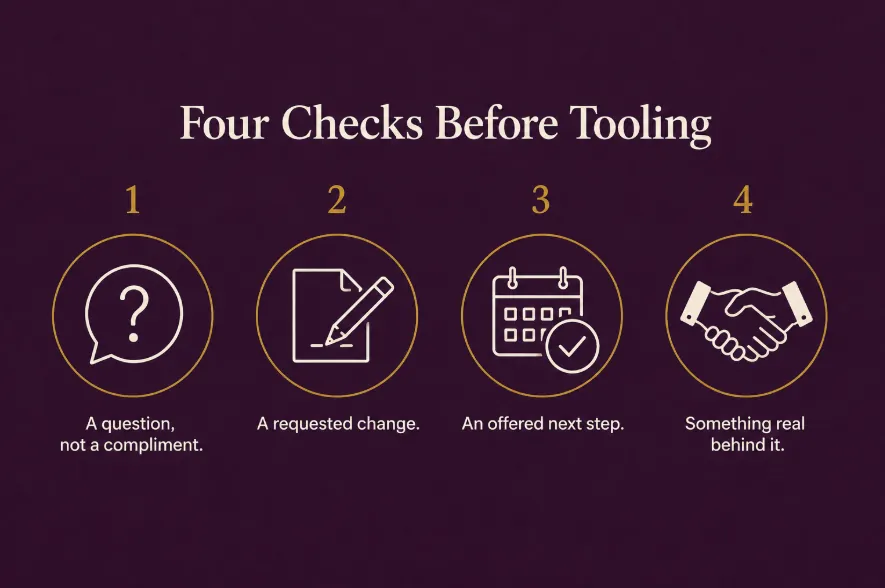
Positive feedback isn’t proof. Four checks before you pay for tooling.
A reply feels like validation. It isn’t, not yet. A rendering can get someone to respond without proving they’d actually buy or license the finished product. Before you spend on tooling, run the reaction through four checks.
① Did they ask a question, or just compliment it? A specific question about price, materials, or timeline means they’re evaluating the product. “Looks great” on its own is politeness, not interest.
② Did they ask for something to be changed? A real buyer pictures using the product, and pictures what’s wrong with it. No requested changes at all usually means they didn’t look closely enough to have an opinion.
③ Did they offer or agree to a next step? A call, a sample request, an introduction to someone else on their team. Vague enthusiasm with no next step is the compliment version of interest.
④ Would they put something real behind it? Money, time, a signed pilot, a spot in a review queue. If the answer is no, or “maybe later,” the reaction hasn’t been tested yet, it’s just been heard.
Zero or one of these, and the reply was polite, not validating. Two or three, and you have a real conversation worth continuing. All four, and you’ve earned the next real decision: what to build to answer their specific question.
That’s where a rendering’s job ends and a prototype’s job begins. A rendering shows what the product looks like and how it’s used. It doesn’t prove the function works, and it isn’t evidence of manufacturability. It answers “will someone want this.” A prototype answers a different question: “can this actually work, fit, or be made.” Those are separate uncertainties, and they don’t resolve at the same time.
Here’s the decision rule for the second question: would a serious buyer be unable to move forward unless you physically demonstrated this specific function, fit, or performance claim? If no, keep pitching the rendering. Let real conversations tell you which physical proof you’ll actually need next, instead of guessing. If yes, build the smallest, cheapest version that answers that one question, not a polished prototype.
A rendering is usually enough for a first conversation when the product is simple to understand, the function is familiar, and the improvement is in configuration, convenience, or appearance. A prototype is worth building sooner when the pitch depends on a claim buyers will naturally doubt: a novel mechanism, a tight fit or installation, a safety or performance requirement, or how it integrates with something that already exists. If you keep hearing “it looks good, but does it actually work,” more outreach won’t fix that. A focused prototype will.
One caveat worth naming: this sequencing reflects common practice among product-development and licensing professionals, not a verified industry benchmark, since licensing outcomes vary by category and aren’t tracked in any public dataset. The one part of this that is solidly documented is narrower: the USPTO does not require a working prototype to file a patent application, as long as the written description and drawings explain the invention clearly enough for someone skilled in the field to understand and make it.
Have a prototype plan ready before you need one
Passing the four checks doesn’t mean you start building immediately. It means you should already know how you’d build if asked, so you’re not scrambling the moment a serious buyer says “show me it working.”
Before you ever send the rendering, put together your own prototype plan, even if you never end up needing it:
● Materials. What would a rough functional version actually be made of. A cheap stand-in is fine, it doesn’t need to match what you’d eventually use for tooling.
● Who could build it. A local maker, a 3D printing service, a fabrication shop, or you, with basic tools. Know the name or the service before you need it, not after.
● Rough cost and timeline. Even a wide estimate is enough. You want to be able to say “I could have a working version in three weeks for around this much” without guessing out loud on a call.
● The one function it needs to prove. Not the whole product, just the specific piece a buyer would doubt. Everything else on the product can stay unfinished at this stage.
Keep this as a short written plan, not something you’re recalling from memory under pressure. When a buyer asks the direct question, “can this actually work,” answering with a real timeline and a real plan is itself a signal that you’re prepared, not just hopeful. This plan stays exactly that, a plan, until one of the four checks above tells you it’s time to use it.
The buyer, in two phrasings
For a frustration-based invention like the pantry step stool:
Parents and small-space renters experience needing a step stool but having nowhere flat to store it, and need something that stores out of the way without giving up counter or floor space.
For a desire-based, novelty invention, the same framework shifts to what the buyer wants instead of what they’re solving:
A buyer for a fun or novelty product wants a specific feeling or experience, and currently settles for a lesser alternative that doesn’t fully deliver it.
Both phrasings matter here because they change what your rendering needs to show. A frustration-based product needs a context shot that makes the problem it solves obvious. A desire-based product needs a context shot that makes the feeling land.
Copy-paste AI prompts for this week
“Write a one-sentence, plain-language description of what [product] does, with no jargon, that a stranger could understand instantly.”
“Generate a realistic product rendering of [describe materials, size, color, and how it attaches or mounts] from three angles, on a plain background.”
“Generate the same product shown in real use in [describe the real environment: a pantry door, a car back seat, a kitchen counter], so a viewer can immediately see how it works.”
“Here is a rendering of my product [describe what looks off]. Regenerate it with these specific changes: [list changes].”
“Write a short, three-sentence outreach message to accompany this rendering, describing the function in plain language, without overselling or using superlatives.”
Key takeaways
● Getting ignored is usually a presentation problem, not an idea problem.
● A rendering doesn’t need to be real. It needs to be clear enough for someone to picture the product in five seconds.
● The Rendering Brief: function first, form specifics, a context shot, then iterate before you send.
● A reply isn’t proof it’ll sell. Run it through four checks: a question instead of a compliment, a requested change, an offered next step, and a willingness to put something real behind it.
● Have a prototype plan ready before you need it: materials, who could build it, a rough cost and timeline, and the one function it needs to prove. Write it down before you pitch, not after someone asks.
● A rendering proves what the product looks like. It doesn’t replace validating demand or testing function, and it isn’t your cue to order tooling on its own.
● This week builds directly on Week 5’s Validation Assessment. If you haven’t run yours yet, that’s the step before this one.
FAQ
Do I need a patent before I send a rendering to a company?
Not necessarily. Many inventors show early renderings under an NDA or after filing a provisional patent, depending on the audience. This week’s focus is on making the rendering itself clear enough to start a conversation. Patent timing is its own decision and deserves its own research before you submit anything formally.
What AI tool should I use to generate the rendering?
Any AI image generation tool that can take a written description and produce a realistic product image works for this. The tool matters less than the specificity of what you feed it. A vague prompt produces a vague result regardless of which tool you use.
What if the rendering doesn’t look quite right?
That’s expected on the first try. Describe exactly what’s off, proportions, materials, color, and regenerate. Most inventors get a usable result within two or three iterations.
Is a rendering enough, or do I still need a prototype eventually?
It depends which question is still open. A rendering answers “will someone want this.” A prototype answers “can this actually work, fit, or be made.” If a serious buyer can’t move forward without seeing a specific function, fit, or performance claim demonstrated physically, that’s your prototype trigger, build the smallest version that answers just that question. If buyers are still deciding whether they want it at all, keep pitching the rendering.
A company replied and said they loved it. Isn’t that a green light?
Not by itself. Run it through the four checks: did they ask a question instead of just complimenting it, did they request a change, did they offer a next step, would they put something real behind it. A warm reply with none of those is encouragement, not evidence. Two or more, and it’s worth continuing the conversation before you spend anything on tooling.
What should I have ready in case a buyer asks to see it work?
A short written plan: what materials a rough functional version would use, who could actually build it, a rough cost and timeline, and the one function you’d need to prove. You’re not building anything yet, you’re making sure you can answer “how soon” with a real number instead of “let me get back to you.”
Next steps
Last week covered the Validation Assessment, the tool that checks demand before you invest. This week covers how to show that validated idea to someone else before you’ve built anything. Next week covers what to do once someone actually responds.
Related reading
Ready for a structured score?
Take the free Validation Assessment. 15 questions, 5 minutes, instant clarity.
Get Your Validation Assessment (Free)